
Want to Learn How to Effectively Create A Storyboard for Your Video Project?
Sometimes in life, we allow technical things to stop us in our tracks from pursuing a dream. We know the "thing" we want to achieve requires study, research, and technical "know-how" yet we become intimidated at the mere thought of doing something "technical". When creating a new film or video project, you start with an idea and concept. Writing out your "story" so that others can grasp your message is necessary to intrigue your audience. One of the key pieces of material needed is a Storyboard. A Storyboard paints the picture to the director and other crew members and helps the creator of the project to lay out the foundation of their story. One should always have a storyboard before production work takes place. How can one complete a project if all the parties involved do not understand the message the creator wants to achieve. Let me show you how to create your storyboard with ease and simplicity. Now, let's talk about "Storyboarding".
What is Storyboarding?
Lately, as I've begun talking a lot about production work, I have been asked, "what is storyboarding and why is it necessary for me to learn how to storyboard my projects?" A storyboard is a visual outline of a film (be it a short film or feature film) or animation. It?s an important part of the preproduction process and consists of a series of images that show everything that?s going to happen in your finished piece. Many storyboards are hand-drawn, but some creators or animators choose to use storyboarding software.
Storyboarding is almost like telling a story to an audience using visual and written directions and it helps the technical crew in a studio setting to know the direction or actions to take at each stage of filming. One mistake some people may make is to negate writing a script for the project because they have created a storyboard. In reality, you need to have both. Scripts are also necessary for completing the first stage of production also known as "pre-production".
Pre-production, production, and post-production are the 3-part actions filmmakers or videographers take in completing a film or video project. Each aspect requires time and technical skill.
Pre-Production is crucial in the process to execute a successful production taping schedule and helps you to complete the post-production tasks which include editing, retakes, graphic overlays, audio, lower thirds and titles, splicing, and rendering.
Where Did It All Begin?
According to Wikipedia, The storyboarding process, in the form it is known today, was developed at Walt Disney Productions during the early 1930s, after several years of similar processes being in use at Walt Disney and other animation studios. Many large-budget silent films were storyboarded, but most of this material has been lost during the reduction of the studio archives during the 1970s and 1980s. Others may not agree with this, whether it is true or not is not mine to judge, but what I do know is Storyboarding does help the filmmaker/videographer organize their video shots and lay out a clear foundation of the complete set of events that will take place from the beginning of the project to the end.
????????????????????????
How Do I Create A Storyboard for My Video Project?
When creating your storyboard for your project, you can simply get a piece of paper and drawer panels or rectangles. The storyboard should have a series of panels. You can then sketch a series of images arranged in sequential order depicting the important changes of scene and action in a series of shots (as for a film, television show, or commercial).
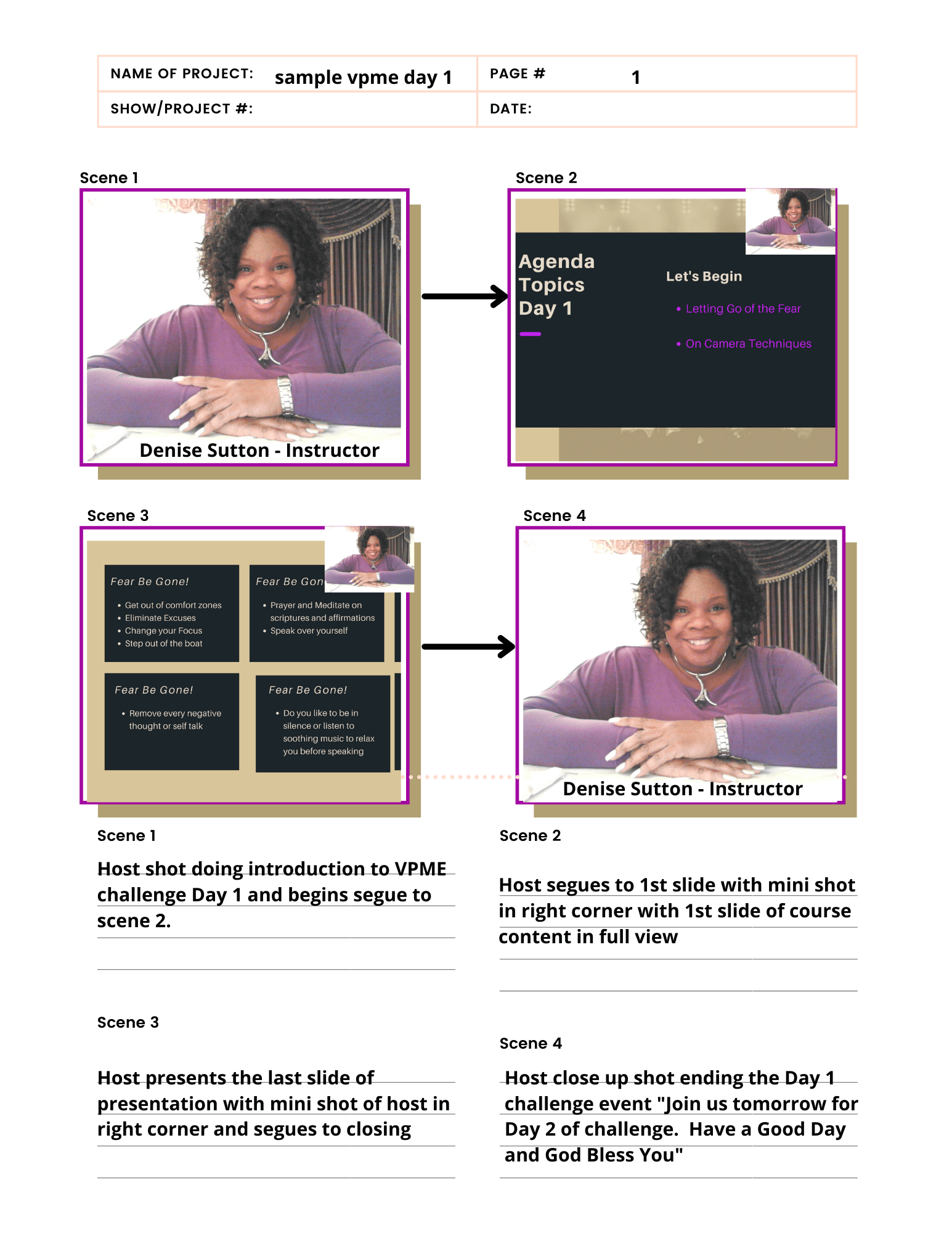
Below is an example of a storyboard I created as part of a training class I teach in the Let Your Light Shine 5 Week Intensive Production Training. Each square/panel depicts a scene in sequential order and the next scene progresses to the next scene to show the next action or scene. At the bottom, a description is added for each numbered scene which gives direction and clarity to the technical director and crew members. You can follow this template or create your own to help you as you design your storyboard. Creating a storyboard has helped me keep my content organized. It helps me to narrow down the content that is vital to see and guides the flow of the project. It also allows me to know what to eliminate from the project. You may do many revisions in the storyboarding process and have a plethora of pages by the time you have completed the storyboarding process. At the end of the process of storyboarding, the final product should serve as a tool to direct your crew members to instantly know what camera shots and angles to set up. It sets the stage for making the production day run smoothly without you or the director repeating it verbally having to reiterate it verbally over again.
Summary
The ball is now in your court and it is now time for you to try and create a storyboard for your new project. Layout your story on paper or using the template and write out your scenes with directions, segues, and written out dialogue. I am looking forward to viewing your completed storyboards for your upcoming project. You can do it! Leave a sample in the comments section below and let me know if what I have shared has been helpful to you as you continue your journey in the broadcast production arena.
If you would like a copy of my template, please use the link here to download and use for your future projects.
Did you find This Blog Post Helpful?
If it piqued your interest, let me know in the comments below!
Feel free to share this post with all your loved ones.
Don't Sit On The Sidelines,
"Let's Take It Up A Notch"
Denise Sutton
Video Presence Consultant
FREE 5 DAY CHALLENGE: "Video Presence Made Easy"
Email: denise.denisesuttonconsultant.com
Twitter: DeniseSuttonConsultant (@DeniseSuttonCo1) / Twitter
Facebook: Denise Sutton Consultant | Facebook
Instagram: Denise Sutton (@denisesuttonconsultant)